


Shipmate - Cruise Tracker
4.73.94K Reviews
App Specs
- Version
- 4.30.14
- Updated On
- License
- Free
- Downloads
- 1,000,000+
- Developer
- Cruiseline.com
- Categories
- Travel & Local
- Platform
- Android
Screenshots
 Analysis by AppCompare
Planning a cruise is exciting, but the practical details can become scattered quickly: a sailing date in one email, a port schedule in another, a price change noticed too late, and a growing list of excursions to compare. I found Shipmate - Cruise Tracker most useful as a mobile planning companion that brings those decisions closer together. It is not trying to replace every cruise website or become a complete travel office. Its strength is giving cruise-specific information a more convenient home on a phone.
Developed by Cruiseline.com, this free Travel & Local app combines cruise tracking, deal discovery, price alerts, ship and sailing reviews, excursion information, and countdowns. That combination matters because cruise planning is rarely one single task. I might begin by checking a ship, return later to compare an itinerary, and then use the countdown simply to keep the trip visible. The best way to use Shipmate is as a planning layer between research and departure, rather than as the only source for every final travel decision.
How Shipmate fits into real cruise planning
I find Shipmate most useful when a cruise is still taking shape: I have a ship or sailing in mind, but I’m not yet sure whether the price, itinerary, and time ashore make sense together. This section looks at how I’d turn that early interest into a practical shortlist, then considers the checks I’d keep outside the app before making a final decision.
Useful when the network is available
Shipmate feels most valuable before the ship leaves, while I have a reliable connection and enough time to browse. This is when deal research, reviews, itinerary checks, and excursion comparisons are easiest to use. A cruise is a large purchase, so having these related tools in one app reduces the need to jump repeatedly between general search results, cruise-line pages, and separate review sites.
The network-dependent nature of this experience is worth keeping in mind. Information such as current deals, alerts, reviews, and excursion details is most useful when the app can reach up-to-date online content. I would not treat the app as a guaranteed substitute for saved travel documents or official cruise-line instructions. Before leaving home, I would still keep booking details, identification requirements, port directions, and any essential confirmations accessible through dependable means.
That distinction is not a criticism of Shipmate; it is simply the reality of a travel app built around changing information. Prices move, availability changes, and port plans can be adjusted. An app that helps me notice those developments is valuable, but it should support—not replace—the final information supplied by the cruise operator.
A practical workflow for choosing a sailing
I would start with the cruise tracker rather than immediately browsing random deals. Tracking gives the app a clear purpose: I can focus my attention on a particular sailing or ship instead of treating the whole cruise market as an endless stream of possibilities. From there, price alerts are more useful because they connect to something I am genuinely considering.
Worth Reading Before You Choose

EA SPORTS FC Mobile 26 Is a Bigger Football Game, but It Takes Time

Flipboard Shows What News Apps Must Do Beyond the Feed

Switching to Android Auto Means Rethinking Your Driving Routine

Google Calendar Makes a Crowded Week Easier to Manage

Ludo King Makes the Most of the Minutes Between Plans

Baby Panda World Brings Quick Play to Modern Phones, but Its Game Library Feels Busy
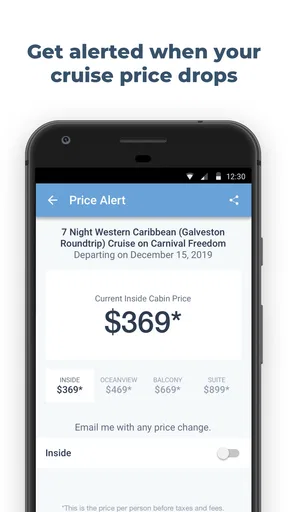
One of the more helpful trade-offs is that alerts can prevent constant manual checking, but they do not automatically tell me whether a change is truly a good purchase. A lower fare may come with a different cabin, restrictions, or conditions that matter to my trip. My tip is to use an alert as a prompt to investigate, not as a reason to book immediately. I would compare the updated offer with the original cabin category, itinerary, and total travel plan before making a decision.
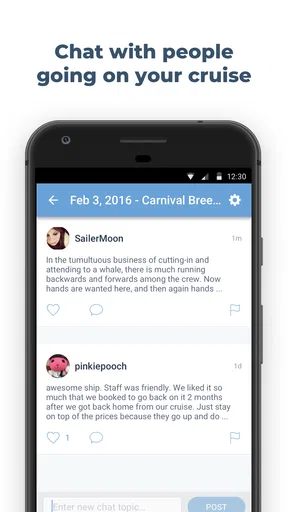
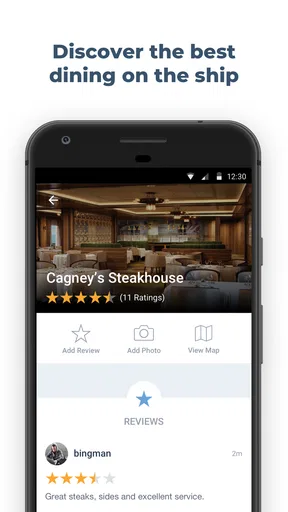
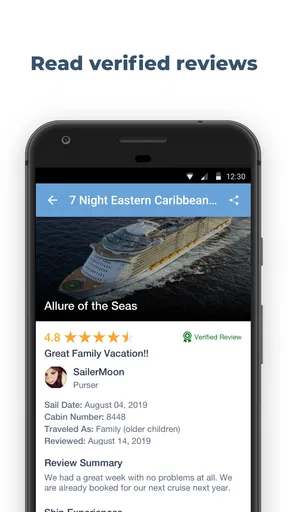
Reviews add another layer that a basic booking search often lacks. I found them more useful when read for patterns rather than isolated complaints. One review may reflect a personal preference, while several comments about embarkation, dining, cabin location, or shore days can reveal the kind of experience a ship tends to provide. The app’s review material is especially helpful for narrowing choices, though I would still balance it with official details and current sailing information.
Using the app in everyday mobile situations
The phone format makes sense for the moments when cruise planning happens casually. I can imagine checking a possible sailing during a lunch break, looking at a ship while discussing vacation ideas with family, or opening a countdown when the trip begins to feel real. These are small interactions, but they are exactly where a focused app can be more comfortable than a collection of browser tabs.
A realistic scenario would be a couple deciding whether to keep a cruise they have been watching or switch to another sailing. One person can check the tracked sailing and its price activity while the other looks through ship feedback and excursion possibilities. Instead of making the decision from a single fare number, they can consider the whole trip: the ship, the ports, the available activities, and whether the price movement justifies waiting.
That workflow also exposes a limitation. A phone is convenient for quick comparisons, but less comfortable for studying many itineraries side by side. If I were making a complicated family booking with multiple cabins, flights, transfers, and special requirements, I would prefer a larger screen and the cruise line’s booking tools for the final arrangement. Shipmate is better at discovery and monitoring than at replacing a full desktop planning session.
Countdowns are simple, but not pointless
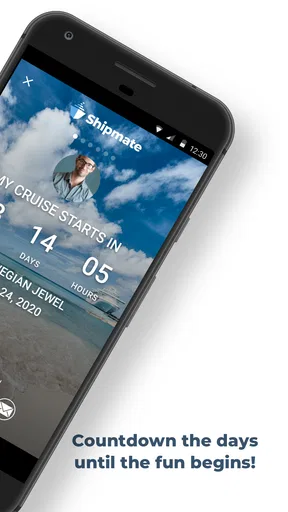
The countdown feature is not the reason I would choose the app, yet it gives the tracker a more personal feel. A cruise can be booked months before it feels real, and a visible countdown turns an abstract reservation into an approaching event. I like that this sits alongside practical planning rather than being presented as a separate novelty.
Still, I would judge the countdown as a reminder, not a travel-management system. It can keep the sailing in view, but it does not remove the need to check embarkation instructions, transport arrangements, documents, or changes from the operator. Its value is emotional and organizational: it helps me remember the trip while the more serious work continues elsewhere.
Excursion research needs a cautious approach
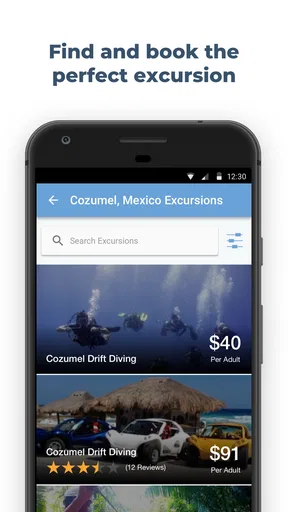
Excursion information is one of the areas where Shipmate can save time, particularly when I am unfamiliar with a port. It gives me a place to begin thinking about what to do ashore instead of waiting until the last minute. I would use it to build a shortlist, then examine the timing and practical demands of each option carefully.
The important trade-off is flexibility versus certainty. An independent activity may look attractive, but cruise days run on strict schedules. I would pay close attention to travel time, the distance from the port, the length of the activity, and what happens if transportation is delayed. I would also check whether the activity is suitable for everyone in my group. Shipmate can help me discover possibilities, but I would not assume that an appealing description guarantees a stress-free return to the ship.
For travelers who prefer cruise-line-organized excursions, the app may be more useful for inspiration than for the final purchase. For independent travelers, it can help create a realistic shortlist, but I would keep a generous time margin and verify the final arrangements before committing. That is a more sensible use than treating any travel listing as a complete guarantee.
What happens when connectivity becomes unreliable
Cruise travel creates an unusual relationship with connectivity. Before departure, I may have fast and dependable service. At sea, access can be slower, limited, expensive, or inconsistent depending on the ship and my own arrangements. Because Shipmate centers on live travel information, I would do the important research before boarding rather than assume I can comfortably retrieve everything later.
My preparation would be straightforward: review the tracked sailing, note the key itinerary details, save the practical information I expect to need, and keep official confirmations separately available. I would also take screenshots or written notes of anything essential if the app presents information I may want to consult during a connection gap. This is not the same as claiming the app provides offline access; it is simply a sensible personal backup habit.
If the app cannot refresh at a particular moment, I would first check whether the problem is temporary connectivity rather than immediately assuming the information has disappeared. A stable connection at home or in port is a better time to update plans. For urgent changes, the cruise line remains the more appropriate authority, especially for embarkation, cancellation, or schedule instructions.
This is where Shipmate’s role becomes clear. It is excellent for helping me prepare and monitor, but it should not be the sole recovery plan when something goes wrong. A phone with limited service, a depleted battery, or a last-minute port change can turn a convenient app into an inaccessible one. Good travel preparation means keeping the important parts of the plan independent from any single app.
Keeping mobile use focused and data-conscious
I would use Shipmate selectively rather than leave it open throughout the day. Cruise research can easily become repetitive, especially when I keep revisiting the same sailing without a clear decision to make. Tracking and alerts are more efficient than manually refreshing pages every few hours. They let me reserve attention for meaningful changes.
On a limited connection, I would prioritize the information that affects a decision: price movement, itinerary changes, ship reviews, and excursion details for ports I actually plan to visit. Browsing every available sailing or repeatedly opening image-heavy content is less useful. A short research session with a written shortlist is likely to be more effective than casual scrolling.
I would also be careful about interpreting an alert as a complete update. An alert can tell me that something deserves attention, but I still need to open the relevant details and confirm what changed. This is a useful habit with any travel service: notifications are prompts, not proof that the entire booking picture has improved.
For families, focused use can prevent another common problem: everyone researching separately and ending up with conflicting assumptions. I would choose one tracked sailing, record the questions that matter to the group, and use the app to support a shared conversation. That makes the mobile experience less about collecting endless options and more about reaching a decision.
Who will get the most from it?
Shipmate is a strong fit for people who cruise regularly, compare several possible sailings, or want an easier way to follow deals and price changes. It is also useful for first-time cruisers who need a cruise-specific starting point rather than a broad travel search engine. The mix of reviews, ship information, excursions, and countdown tools makes the planning process feel more connected.
It is less suitable for someone who already has a fixed booking and only needs official boarding instructions, onboard account management, or a complete digital travel wallet. In that situation, the cruise line’s own app will usually be the more direct tool. I would also look elsewhere if my main priority were flights, hotels, rail travel, or a broad destination itinerary; Shipmate is clearly centered on the cruise decision and experience.
Travelers who dislike notifications may want to keep alerts tightly controlled and track only serious candidates. Likewise, people who expect every travel function to work smoothly without a connection should plan around the app rather than rely on it. Its usefulness is highest when I treat it as an informed research companion with sensible backups.
What the numbers suggest about its place in the market
The app has been available since January 28, 2011, and its current version is 4.30.14. That long presence gives it the feel of an established cruise-focused tool rather than a temporary booking experiment. It has passed one million installs, with a 4.7 average from around thirteen thousand ratings and roughly 3.9 thousand written reviews. Those figures do not guarantee that every user will enjoy the same workflow, but they do show that the app has attracted a substantial audience.
Shipmate is free, which lowers the barrier to trying it alongside the cruise line’s own application. It carries a Teen content rating and requires Android 12 or later, so compatibility is one practical point to check before planning around it. The free price is especially appealing for occasional cruisers who want tracking and research without committing to another paid travel service.
Compared with a general travel search app, it offers a narrower but more relevant experience. A general service may be better for assembling flights, hotels, and ground transportation, while Shipmate focuses attention on cruise-specific choices. Compared with a cruise-line app, it is more useful earlier in the process, when I am comparing ships, watching prices, reading broader feedback, and considering excursions. The two types of app solve different problems, and using both can make more sense than expecting one to do everything.
My connectivity verdict
After using Shipmate as a cruise planning tool, I see its biggest strength in the period before departure: connected research, targeted monitoring, and quick mobile decisions. It helps turn a vague idea such as “we should take a cruise” into a more organized process involving a ship, a sailing, a price, port activities, and a realistic sense of what other travelers experienced.
Its main limitation is also clear. The app’s most useful information depends on being able to access current content, so I would not board a ship assuming it will serve as my only source of travel information. I would prepare while connected, keep essential details available through separate backups, and use official cruise-line channels for urgent operational changes.
My recommendation is positive for anyone comparing cruises or trying to stay on top of a sailing they may book. I especially like the combination of tracking, alerts, reviews, and excursion research because it supports decisions instead of merely displaying a countdown. If your needs are limited to managing an existing reservation, or if you want a complete offline travel folder, another tool may suit you better. For connected cruise discovery and monitoring, though, Shipmate earns a place on my phone as long as I use it with realistic expectations about connectivity.
Pros
- Tracks itineraries for many cruise lines in one place.
- Port details help with planning shore visits.
- Sailing countdowns make upcoming trips easy to follow.
- Community updates can provide useful ship information.
- Clean layout keeps key cruise details easy to find.
Cons
- Some features may require a premium subscription.
- Cruise data can depend on user updates and may be outdated.
- Not every cruise line or ship may be supported.
- Community information quality can vary between sailings.
- It may use extra battery when location features are enabled.
FAQs for Shipmate - Cruise Tracker
What is Shipmate - Cruise Tracker used for?
Shipmate - Cruise Tracker is designed to help cruise passengers organize and follow their trips in one place. After selecting a cruise, you can view itinerary details, port information, ship-related content, and useful travel updates. It is particularly helpful before departure, while planning shore visits, and during the sailing when you want quick access to your cruise schedule.
Does Shipmate support all cruise lines and ships?
Shipmate covers a wide selection of cruise lines, ships, and sailing itineraries, but availability may vary depending on the cruise company and the specific voyage. Before relying on the app, search for your ship and sailing date to confirm that the correct information is listed. Some newer or less common itineraries may take time to appear or may have limited details.
Can I use Shipmate without an internet connection?
Some information may remain accessible after it has been loaded, but Shipmate should not be treated as a completely offline cruise guide. Itinerary changes, current port information, community updates, and other dynamic content may require an internet connection. For a sailing where mobile data is expensive or unavailable, save important details and screenshots before leaving port.
Does Shipmate provide live cruise tracking and itinerary updates?
Shipmate can provide cruise-related tracking and itinerary information, but the accuracy and speed of updates may depend on available data sources, your internet connection, and the cruise line’s published information. It should be used as a convenient planning tool rather than the only source for urgent announcements. Always check official onboard notices for schedule changes.
Is Shipmate free to download, and are there any additional costs?
Shipmate is generally available as a free download, although certain features, advertising arrangements, or optional services may vary between versions and platforms. The app itself does not replace cruise bookings, shore-excursion fees, onboard purchases, or mobile-data charges. Review the current Google Play or App Store listing before downloading so you understand any in-app purchases or subscription terms.


